
DISCLAIMER: This article is by no means a complete guide to phishing, and Komwatch takes no responsibility for errors or omissions, and also takes no responsibility should you fall prey to phishing after having followed the suggestions below. This article merely tries to make the reader aware of phishing, and gives some of the more common ways phishing occurs with some examples.
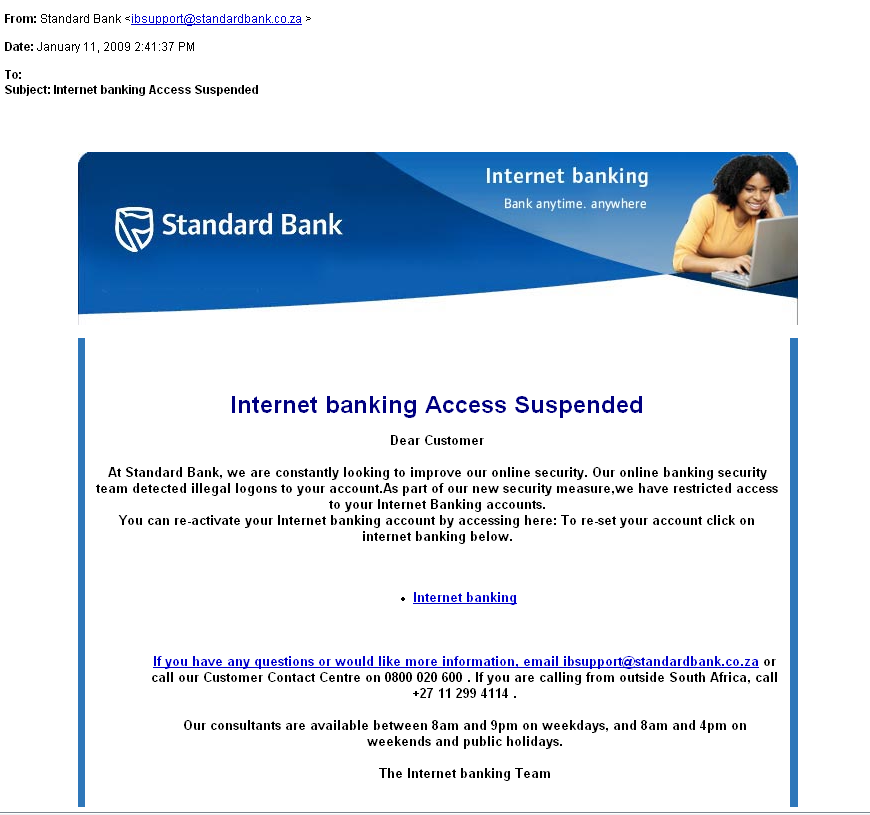
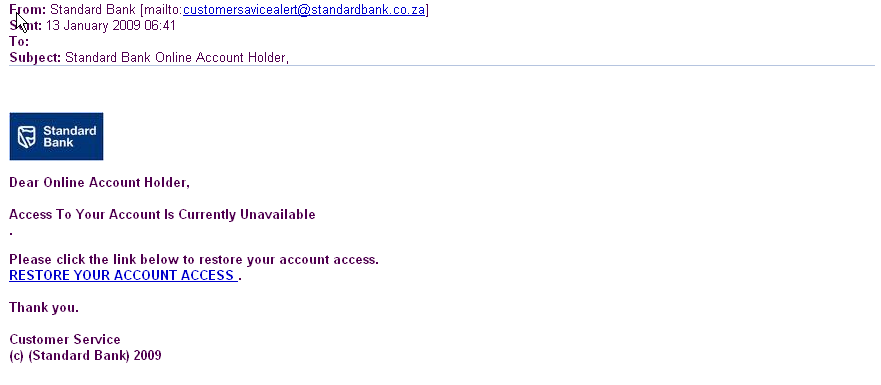
In the last week or so we have been forwarded 2 separate phishing emails attempting to gain access to internet banking account details of the account holder. These phishing emails occur from time to time, and we felt that the topic of phishing is one we should write an article about to educate our members.
(There are more links to phishing articles and further examples at the bottom of the page )
Wikipedia defines phishing as follows:
In the field of computer security, phishing is the criminally fraudulent process of attempting to acquire sensitive information such as usernames, passwords and credit card details by masquerading as a trustworthy entity in an electronic communication. Communications purporting to be from popular social web sites (YouTube, Facebook, MySpace, Windows Live Messenger), auction sites (eBay), online banks (Wells Fargo, Bank of America, Chase), online payment processors (PayPal), or IT Administrators (Yahoo, ISPs, corporate) are commonly used to lure the unsuspecting. Phishing is typically carried out by e-mail or instant messaging,[1] and it often directs users to enter details at a fake website whose look and feel are almost identical to the legitimate one.
Depending on the skill of the phisher it can be easy or difficult to determine if a website is fake or not, but here are some (not exhaustive) tips. (i.e. even if all these tps check out the website you are visiting could still possible be fake, but these are a good set of rules to follow which should cover all but the mose advanced phisher)
- When on a Banking site, check that the URL in the address bar is EXACTLY the same as usual in your browser.
- Check for the little security Lock Icon indicating an encrypted connection, verify the security certificate by clicking on the little lock.
- A bank will in general not email you to tell you that your internet banking account is blocked, and that you must visit their site to re-activate it. This or slight variations on this is the usual way I have seen phishing attempts.
- A bank will in generaly never require you to enter your internet banking login details anywhere except when you actually login to internet banking.
- In general when entering internet banking, NEVER follow a hyperlink you received in an email, especially unsolicited email, no matter how legitimate the email looks. Rather type the address, which you should know by heart, manually into the address bar of your browser when you wish to conduct internet banking, or in general go to a banking site.
- If you receive a mail, hover your mouse over any hyperlinks. Your browser will show you, usually at the bottom of the screen somewhere, the URL or address to which that link will take you. Does the URL look legitimate?
- In general when doing online banking, learn to know the website, the look and feel, the menus, the URLs and all the little details. You will then more easily be able to spot a fake site. Be suspicious if anything changes - and verify with your bank if they made those changes.
- Check that the URL in the address bar is not simply an image - ( can you place your cursor in it and edit the address? )
- Don't do online banking on public computers like internet cafes. In general always do online banking on your own computer only, and only by manually typing in the your banks URL.
Again from Wikipedia:
Link manipulation
- Most methods of phishing use some form of technical deception designed to make a link in an e-mail (and the spoofed website it leads to) appear to belong to the spoofed organization. Misspelled URLs or the use of subdomains are common tricks used by phishers. In the following example URL, http://www.yourbank.example.com/, it appears as though the URL will take you to the example section of the yourbank website; actually this URL points to the "yourbank" (i.e. phishing) section of the example website.[[ The correct URL for this example would have been http://www.yourbank.com/example/...]]
- Another common trick is to make the anchor text for a link appear to be valid, when the link actually goes to the phishers' site. The following example link, http://en.wikipedia.org/Genuine, appears to take you to an article entitled "Genuine"; clicking on it will in fact take you to the article entitled "Deception". [ Added by Komwatch: If you hover over this previous link with your mouse, you will see that your browser tells you the real location, probably near the bottom of your screen. The "flyby" hint will still however appear legitimate.]
The images below, show the phishing attempts we received recently - we have converted these to images so the links are not "live" These two attempts were not particularly good attempts for the following reasons.
- They violate rule 3
- They violate rule 4
- They violate rule 5 - in the original emails, when hovering over the hyperlinks in the emails, the address indicated by the browser was a completely different address to the bank's URL.
- They violate rule 6.
Further Reading:
|